




















If you're into vlogging, live commerce, or producing professional dual interviews, you're embracing the trend of multi-device shooting. But as the number of recording devices increases, one invisible problem always emerges—audio synchronization. When you hit record on all your devices, the true test of your workflow begins in post-production.
Core Audio Pain Points: The Multi-Device Sync Problem
1. The Post-Production Sync Nightmare
-
Architectural Bottleneck: Traditional 2-in-1 wireless microphones are designed for one-device workflows. When scaled to multi-device setups, their point-to-point architecture simply cannot keep all devices synchronized.
-
Inconsistent Track Lengths: One of the most common and frustrating issues. Different devices start/stop recording at microsecond differences, resulting in mismatched audio track lengths.
-
The Pain of Manual Alignment: To align these disparate tracks, you spend massive amounts of time dragging and zooming waveforms. In many real-world workflows, audio sync can easily consume 20–30% of post-production time, depending on the number of devices involved. This inefficiency becomes a major bottleneck in professional workflows.
2. Physical Burden and RF Interference
-
Bulky Physical Setup: The solution of having a creator wear multiple transmitters to feed different devices is cumbersome.
-
RF Desensitization Risk: When these TX units operate extremely close to each other, it significantly increases the chances of RF desensitization or intermodulation issues, compromising the signal stability.
The Solution Concept: Deep Dive into the "2-TX 4-RX" Technology
To solve these pain points, the industry is moving towards a technological solution optimized for scaling: the "2-TX 4-RX" concept. That is, a 2-TX 4-RX wireless system allows two transmitters to send audio to up to four receivers simultaneously, enabling consistent audio capture across multiple recording devices.
What is "2-TX 4-RX" (2 Transmitters ↔ Multiple Receivers)?
-
"2-TX" (Dual Transmitters): The standard for two simultaneous audio sources.
-
"4-RX" (Multi-Channel Reception): This means the system can reliably transmit signals from 2 TX units simultaneously to up to 4 separate Receiving Devices (RX).
Core Principle: The transmitters use a digital broadcast-style link designed for one-to-many transmission. Every RX listens to the same synchronized audio frame packets, ensuring all devices receive identical audio in real time.
The biggest value of 2-TX 4-RX is achieving "Record and Sync," shifting your content creator workflow from "Post-Production Alignment" to "Pre-Production Consistency."
Do You Really Need 2-TX 4-RX? — Self-Check with Three Questions
The 2-TX 4-RX system provides efficiency and safety. Use these three questions to determine if it's right for you:
-
Question 1: Does my content require two or more audio sources (host + guest)?
-
Question 2: Do I need to record the audio simultaneously onto three or more separate devices (e.g., camera, phone, and computer for streaming)?
-
Question 3: Do I need real-time multi-point backup to guarantee audio safety against device failure?

Typical Scenarios Requiring "4-RX"
The system provides maximum value in multi-camera shooting environments:
-
Professional Interviews/Events: Simultaneous capture by Camera 1, Camera 2, Phone/PC (live stream feed), and a dedicated field recorder (audio backup).
-
Multi-Platform Live Streaming: Main camera, phone (vertical content), and PC (streaming software) all recording at once.
-
Summary: Any multi-camera shooting scenario requiring two or more audio sources to be recorded on three or more devices.
Key Point: "4-RX capability doesn't mean you must use all of them, but it allows your setup to expand anytime without replacing the entire system, securing your future content flexibility."
Practical Setup Guide
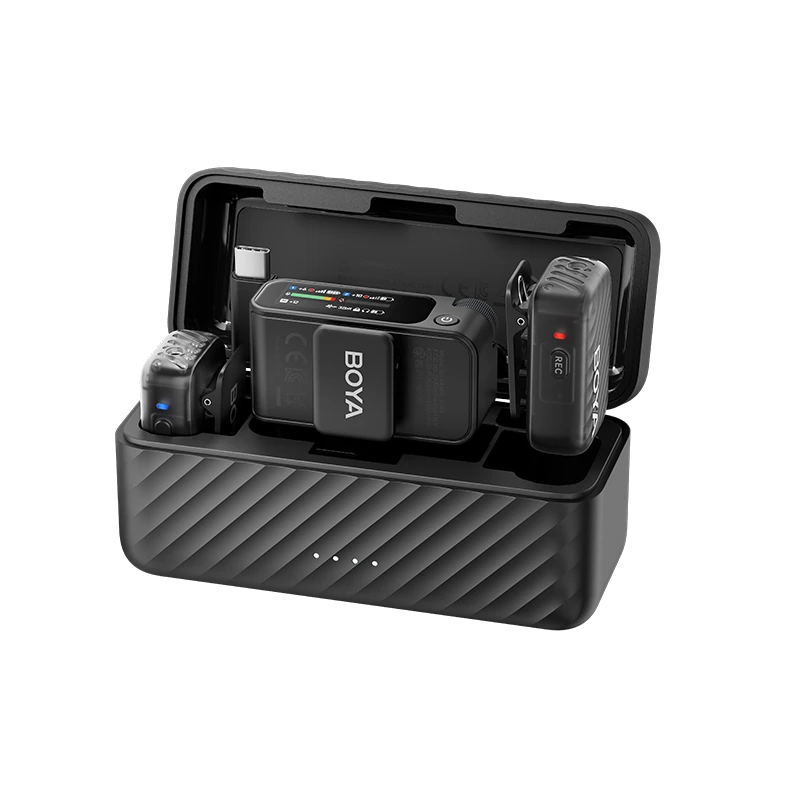
Now let’s move from theory to practice and see how a 2-TX 4-RX system works in real-world setups. We now introduce the BOYALINK3, the system that perfectly implements the 2-TX 4-RX solution.
Step Breakdown:
-
Connect RX: Insert the Link3 receivers using the corresponding adapters (USB-C/Lightning/3.5mm) into your camera, phone, and PC.
-
Pair TX: Start the two transmitters (TX1 and TX2) and confirm they are successfully paired with all active RX units.
-
Level Test: Use the 3.5mm monitor jack on any RX to check levels. Verify that the recording meters on all devices are in the safe zone.
-
Start Recording: Initiate simultaneous recording across all devices.
Sound Quality and Synchronization Tips
-
Temporal Drift: Although the Link3 ensures signal real-time consistency, slight temporal drift (time code discrepancy) can still occur over long recording periods due to differences in the devices' internal clocks. Clapping or using an identifiable marker at the start of the shoot is recommended for easy post-sync.
-
Metadata Record: Always note which TX corresponds to which speaker (e.g., TX1 = Host / TX2 = Guest) in your shot log.
Practical Experience: In real-world event interviews or multi-camera vlogging, creators often overlook that gain settings must be adjusted individually for each RX unit connected to a different host device, necessitating precise calibration.
Product Specs Overview: The Power of BOYALINK3
The BOYALINK3 achieves its professional capability through sophisticated hardware and smart features.
BOYALINK3 Core Specifications
| Feature | BOYALINK3 (2TX ↔ 4RX Support) | Standard Wireless Mic (e.g., 2-in-1) | Link3 Advantage |
|---|---|---|---|
| Scalability | 2 TX ↔ Up to 4 RX Simultaneous | 2 TX ↔ 1 RX (or 2 RX requiring two separate kits) | Multi-point backup and multi-platform distribution. |
| Compatibility | RX includes USB-C, Lightning, 3.5mm TRS | Typically 3.5mm or a single digital port | 3-in-1 Universal Ports for seamless plug-and-play. |
| Smart Noise Cancellation | True AI DNN Noise Cancellation | Basic hardware noise gating or none | Intelligent, clean audio assurance in noisy environments. |
| Safety Recording | Safety Track Mode | Not available | Anti-clipping feature for guaranteed safe audio. |
| Battery Life | TX 6h + Total 30h with Charging Case | Approx. 5-6 hours, short total runtime | Extended operation for all-day shoots. |
Conclusion
The BOYALINK3, with its unique 2-TX 4-RX capability, solves the long-standing multi-device audio sync and compatibility problems for content creators. It establishes a "Pre-Production Consistency" workflow. It is more than a wireless microphone; it is a "Multi-Device Production Efficiency Multiplier."
TL;DR Summary
2-TX 4-RX = Two transmitters → up to four devices receiving the same audio in real time.
Perfect for: multi-camera interviews, event coverage, studio + mobile hybrid setups, and multi-platform streaming workflows.
The BOYALINK3 eliminates audio sync issues by providing real-time audio consistency across all recording devices.
If you are tired of the tedious audio alignment process and are looking for professional, multi-device audio sync freedom for your team, the Link3 is the most valuable production tool to upgrade to.
It's time to embrace 2-TX 4-RX and let audio fuel your creativity!
To learn more about the latest news from BOYA, join in our official social media accounts: Facebook, Youtube, Instagram.
Frequently Asked Questions
Will using multiple RX units drain the TX battery faster?
A: No. The number of active receivers does not significantly impact TX battery life. All RX units simply listen to the same transmitted signal without increasing the TX’s workload.
Can each Link3 RX adjust the gain independently?
A: Gain adjustments are primarily done on the host device. However, the BOYA Central APP allows for fine-tuning via EQ and 4-level AI Noise Reduction, optimizing the signal source.
Can I mix the two TX tracks into a single output channel on my camera?
A: Yes. The Link3 supports Mono and Stereo modes. Selecting Mono mode will combine the TX1 and TX2 signals into a single, mixed output channel.
Why Does Volume Differ Across Devices?
This common issue stems from inherent device differences:
-
The Microphone sends the same signal, but every device interprets that signal differently—this is why calibration per device is essential.
-
Phone AGC: Smartphone apps or systems often activate Automatic Gain Control (AGC).
-
Camera Preamp Variation: Different camera brands have varying built-in preamplifiers.
-
Digital/Analog Gain: Digital interfaces (USB-C/Lightning) and analog (3.5mm TRS) handle gain differently.


